Plumbquill: a house style consistency checker for Google Docs™
Plumbquill reads your document and lists everything written more than one way: color and colour, e-mail and email, a serial comma here and not there, November 12, 2026 and 12 November 2026. Click any one to jump to it, fix it, or set your house style once and check every document against it. The checks and one-at-a-time fixes are free.
What it checks
- Spelling: US vs UK (color/colour, center/centre, analyze/analyse, traveled/travelled, defense/defence, gray/grey: over 5,000 word forms) and -ize vs -ise as its own choice, so Oxford spelling works.
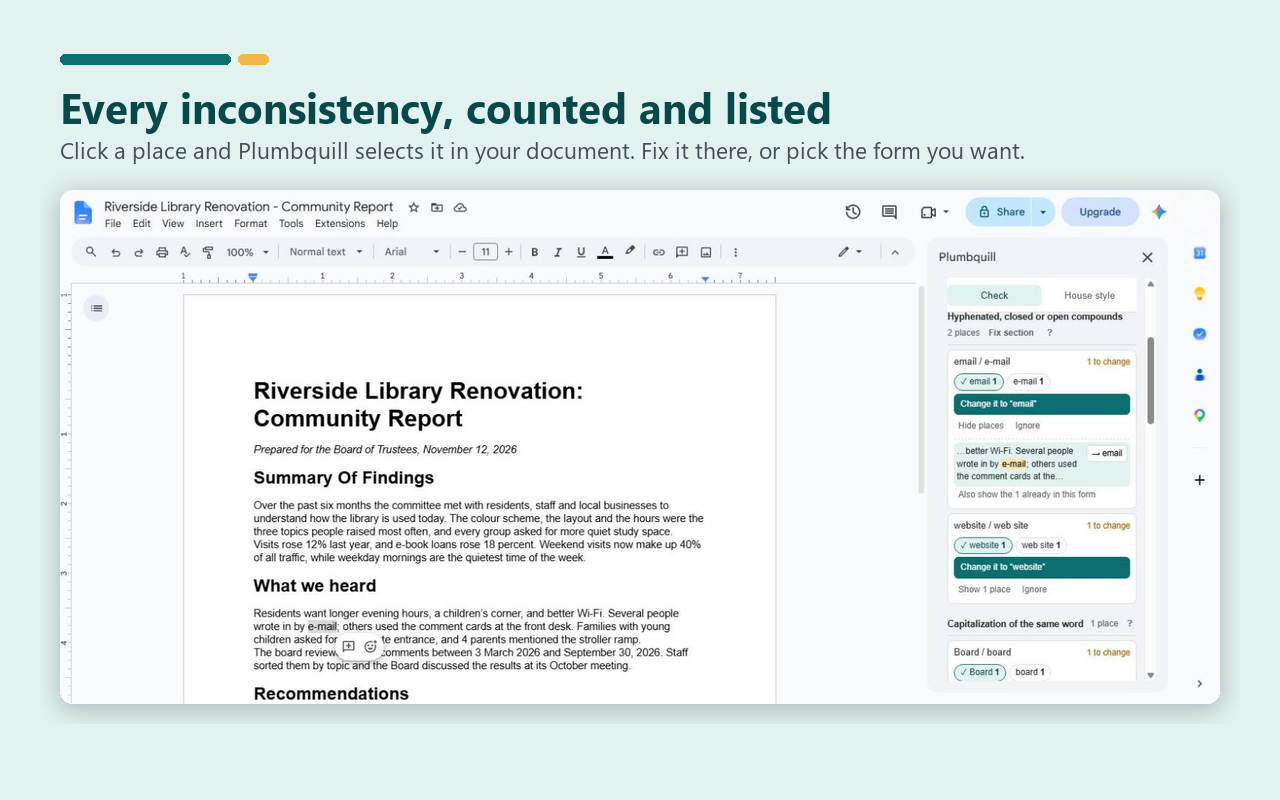
- Compounds and capitals: e-mail/email, web site/website, decision-making/decision making, and the Board/the board, found by comparing your document with itself.
- Punctuation: serial comma, em and en dashes and their spacing, double hyphens, straight vs curly quotes and apostrophes, ellipses, double spaces and spaces before punctuation.
- Numbers and dates: one to nine as words or numerals (skipping page numbers, measurements and the like), 10,000 vs 10000, % vs percent vs per cent, number ranges with a hyphen or an en dash, and four date formats.
- Abbreviations: U.S./US, e.g./eg, i.e./ie, Ph.D./PhD, Mr./Mr, a.m./AM, and the comma after e.g. and i.e.
- Structure: heading capitalization per level (Title Case vs Sentence case), end punctuation within each bulleted list, and acronyms defined twice or used before their definition.
- Your own terms: a house list such as
e-mail, E-mail -> email, kept with the document.
How it works
- Open a Google Docs™ document and choose Extensions > Plumbquill > Check consistency. The check starts by itself, with a progress bar on long documents (body, tables, headers, footers, footnotes and tabs).
- Each inconsistency shows every form with its count. The form most of your document uses is ticked; click another to make it your house style.
- Click any place to select it in the document, click its fix button to change just that one, or ignore the whole item.
Each fix changes only the characters that differ, so bold, italics and links stay where they were, and Edit > Undo reverses it.
Free and Pro
Every check, the counts, jump-to, fixing one place at a time, house style choices, house terms and the three starter styles are free. Plumbquill Pro adds Fix all (one click per inconsistency, per check or for the whole document), a saved library of house styles for every client or publication, and a style sheet of every decision plus a word list, added to the document or downloaded. Pro costs $3.99 a month, $29 a year or $49 once (lifetime access; see our lifetime access policy), and is bought from inside the add-on.
Private by design
Plumbquill can only see the document you're using it in, and has no access to the rest of your Drive. Every check is a fixed rule that runs in your browser: no AI service, no server, no tracking. The only outside request is checking a Pro license key with Gumroad. Read the privacy policy and terms, or get support.
Questions: hello@frontporchpuzzlepress.com
Google Docs™ and Google Drive™ are trademarks of Google LLC. Plumbquill is not affiliated with or endorsed by Google.