Guide
How to Change Case in Google Docs (Caps, Lowercase & More)
Typed a paragraph with Caps Lock on, or pasted a heading that's all lowercase? Google Docs™ can change the case of text without retyping it, but only three ways: lowercase, UPPERCASE and Title Case. Here is where that menu is, what each option does (and doesn't do), and how to get Sentence case, which Docs doesn't have.
Change case with the Format menu
- Select the text you want to change. To change the whole document, press Ctrl+A (Cmd+A on a Mac).
- Choose Format > Text > Capitalization.
- Pick lowercase, UPPERCASE or Title Case.
That's the whole built-in tool. There's no keyboard shortcut for it, but you can get there without the mouse: press Alt+/ (Option+/ on a Mac) to search the menus, type uppercase and press Enter.
How to make all caps in Google Docs
Select the text and choose Format > Text > Capitalization > UPPERCASE. The letters themselves change, so the text stays in capitals if you copy it somewhere else or download the document.
If you only want capitals for looks, for example in a heading, there's also Format > Text > Small caps, which shows lowercase letters as smaller capitals without changing the letters you typed.
How to change all caps to lowercase
Select the text and choose Format > Text > Capitalization > lowercase. Every letter becomes lowercase, including the first word of each sentence, the word "I" and every name. For a heading that's fine; for a paragraph you then have to put the capitals back by hand. What you usually want instead is Sentence case.
Sentence case: what Google Docs is missing
Docs has no Sentence case option. By hand, the closest you can get is: choose lowercase, then click at the start of each sentence and retype its first letter as a capital, along with "I" and any names. On a long paragraph typed in caps, that's slow and easy to get wrong.
The catch with Docs' Title Case
We tested it on November 9, 2026. Docs' Title Case capitalizes every word and lowercases the rest of each word, so
the lord of the rings: working with NASA and my iPhone
became The Lord Of The Rings: Working With Nasa And My Iphone. Small words like of, the and with got capitals that no style guide uses, and NASA and iPhone were changed too. For headings and titles that follow a real style, see how to do Title Case in Google Docs.
Change case with Trimquill (free)
Trimquill is our Google Docs add-on for text tools. Its case changes are free and work on a selection or on the whole document.
- Open the Trimquill page on Google Workspace Marketplace and click Install, or in any document choose Extensions > Add-ons > Get add-ons and search for Trimquill.
- Allow the permissions it asks for. Trimquill works only on the document you have open; it can't read your other files, and your text never leaves Google Docs.
- Back in your document, open Extensions > Trimquill.
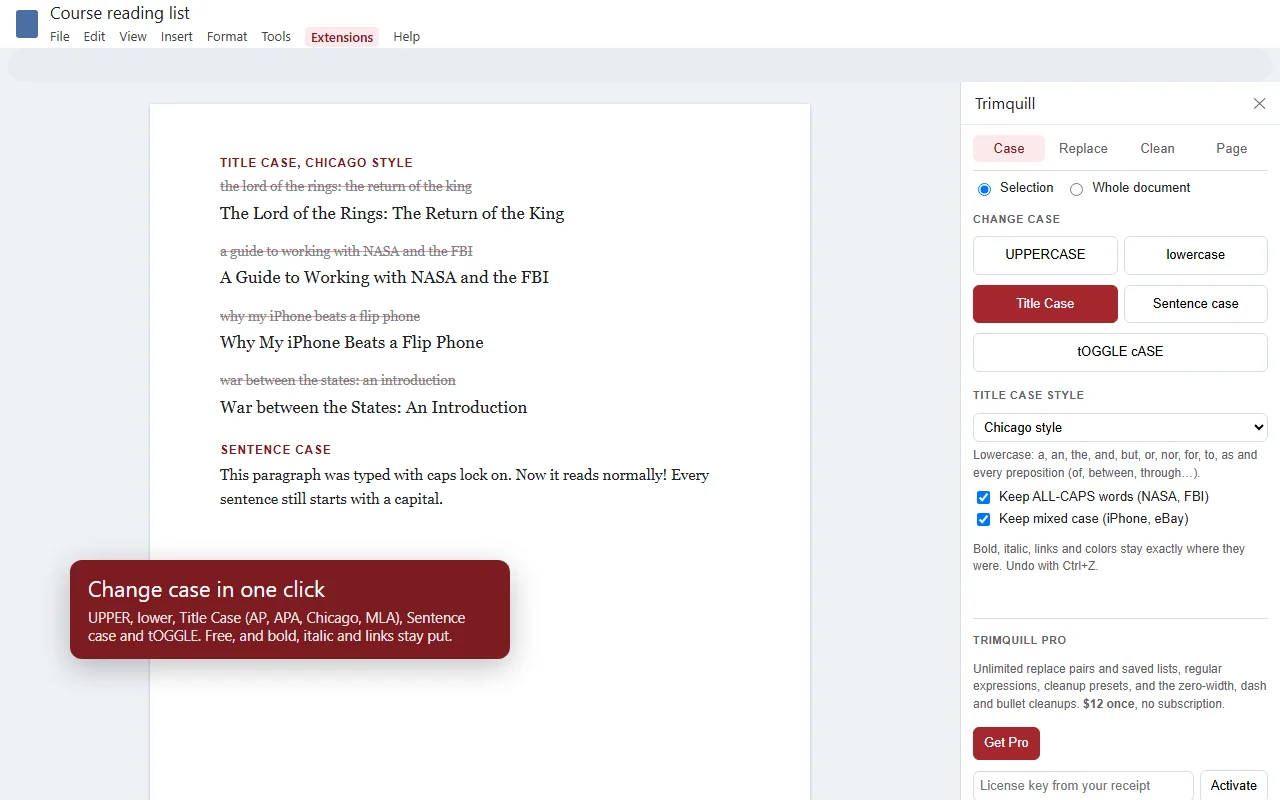
- For a quick change, select text and choose Extensions > Trimquill > Change case, then UPPERCASE, lowercase, Title Case, Sentence case or tOGGLE cASE.
- Or choose Open Trimquill to use the Case tab, where you pick Selection or Whole document and a Title Case style.
What's different from the built-in menu:
- Sentence case. The first letter of each sentence gets a capital and the rest goes lowercase. Abbreviations such as Dr., e.g. and U.S. don't end a sentence, and a selection that starts mid-sentence isn't capitalized.
- Acronyms and mixed case are kept. NASA, FBI, iPhone and eBay stay as they are unless the whole text was typed in capitals.
- Formatting stays put. Bold, italic, links and colors stay on the same words.
- tOGGLE cASE swaps every letter, for text typed with Caps Lock on by mistake.
One honest limit: Sentence case can't tell a name from an ordinary word, so monday or smith stays lowercase. Fix those by hand, or keep a saved Find & replace list of the names you use often. Anything you change can be reversed with Edit > Undo (Ctrl+Z).
Questions & answers
How do I change text to all caps in Google Docs?
Select the text, then choose Format > Text > Capitalization > UPPERCASE. To go back, choose lowercase from the same menu, or press Ctrl+Z (Cmd+Z on a Mac) straight away.
Is there a keyboard shortcut to change case in Google Docs?
No. Docs has no built-in shortcut for upper, lower or title case. The quickest keyboard route is Alt+/ (Option+/ on a Mac) to search the menus, then type uppercase, lowercase or title case and press Enter.
How do I change all caps to lowercase in Google Docs?
Select the text and choose Format > Text > Capitalization > lowercase. Everything becomes lowercase, including the first word of each sentence and names, so for normal sentences use Sentence case in an add-on such as Trimquill instead.
Does Google Docs have sentence case?
No. As of November 2026 the Capitalization menu has only lowercase, UPPERCASE and Title Case. Trimquill adds Sentence case for free: it capitalizes the first letter of each sentence and lowercases the rest.
Why did Title Case change NASA to Nasa?
Google Docs' Title Case capitalizes the first letter of every word and lowercases the others, so acronyms and words like iPhone are changed too. Trimquill's Title Case keeps ALL-CAPS words and mixed case words as they are.
Is Trimquill free?
Every case change is free: UPPERCASE, lowercase, Title Case in AP, APA, Chicago and MLA style, Sentence case and tOGGLE cASE. Trimquill Pro is $12 once, with no subscription, for unlimited find and replace pairs, regular expressions and extra cleanups.