Guide
How to Do Title Case in Google Docs (AP, APA, Chicago, MLA)
Google Docs™ has a Title Case command, but it doesn't follow any style guide: it puts a capital on every single word. That's fine for a quick label, and wrong for a book title, an essay heading or a news headline. Here's how to use the built-in command, how the four common styles differ, and how to get them right without fixing each word by hand.
Title Case with the built-in menu
- Select the title or heading.
- Choose Format > Text > Capitalization > Title Case.
There's no keyboard shortcut. From the keyboard, press Alt+/ (Option+/ on a Mac), type title case and press Enter.
We tested it on November 9, 2026: the lord of the rings: working with NASA and my iPhone came out as The Lord Of The Rings: Working With Nasa And My Iphone. Two problems:
- Every small word gets a capital (Of, The, With, And). No style guide does that.
- The rest of each word is lowercased, so NASA became Nasa and iPhone became Iphone.
So after using it, go back through and lowercase the small words your style calls for, and retype any acronyms. The rules are below.
Title case rules by style
All four styles capitalize the first and last word, the first word after a colon, and every noun, pronoun, verb, adjective and adverb. They differ on the small words:
- Chicago (books, history papers): lowercase a, an, the, the conjunctions and, but, or, nor, for, the words to and as, and every preposition, however long: of, in, between, through, about.
- AP (news, press releases): lowercase articles, conjunctions and prepositions of three letters or fewer (of, in, for, and). Words of four letters or more are capitalized, so Between and About get capitals.
- APA (psychology, education, nursing): like AP, every word of four letters or more is capitalized; short articles, conjunctions and prepositions are lowercase. APA uses title case for your paper's title and headings, but sentence case for article and book titles in the reference list.
- MLA (English and the humanities): lowercase articles, prepositions, coordinating conjunctions and the to in an infinitive (How to Write).
One title, two styles: War between the States: An Introduction in Chicago, War Between the States: An Introduction in AP. When your instructor or publisher gives a rule, theirs wins.
Title Case by style with Trimquill (free)
- Open the Trimquill page on Google Workspace Marketplace and click Install, or in any document choose Extensions > Add-ons > Get add-ons and search for Trimquill.
- Allow the permissions it asks for. Trimquill works only on the document you have open; it can't read your other files, and your text never leaves Google Docs.
- Back in your document, open Extensions > Trimquill.
- Choose Open Trimquill. On the Case tab, pick a Title Case style: Chicago (the default), AP, APA, MLA, or Capitalize Every Word.
- Select your title (or choose Whole document) and click Title Case. Next time, Extensions > Trimquill > Change case > Title Case uses the same style without opening the sidebar.
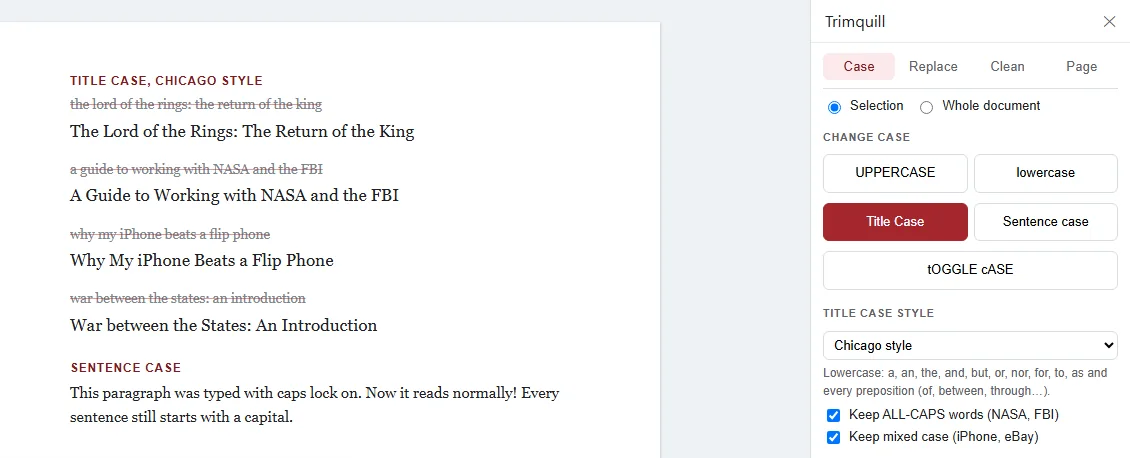
- The first and last words, and the word after a colon or dash, always get a capital.
- Keep ALL-CAPS words and Keep mixed case are on by default, so NASA, FBI, iPhone and eBay survive.
- Bold, italic and links stay on the same words, so The Lord of the Rings keeps its bold.
- Web addresses and email addresses are left alone.
If a word comes out in a way you don't want, for example AP style capitalizing With, try another style or fix that one word. Edit > Undo reverses the whole change.
Need the other cases too? See how to change case in Google Docs, including Sentence case.
Questions & answers
How do I use Title Case in Google Docs?
Select the text, then choose Format > Text > Capitalization > Title Case. It capitalizes the first letter of every word, so short words such as of, the and and need fixing by hand if you follow a style guide.
Is there a shortcut for Title Case in Google Docs?
No. Docs has no keyboard shortcut for Title Case. Press Alt+/ (Option+/ on a Mac), type title case and press Enter to reach it from the keyboard.
What is the difference between Chicago and AP title case?
Chicago lowercases every preposition, however long (between, through, about), plus articles and short conjunctions. AP capitalizes every word of four letters or more, including prepositions, so Between and About get capitals in AP but not in Chicago.
Which words are not capitalized in title case?
In every style: a, an and the, unless they are the first or last word. Most styles also lowercase and, but, or and nor. Prepositions depend on the style: Chicago and MLA lowercase all of them, AP and APA only those of three letters or fewer.
Is the first word after a colon capitalized?
Yes, in all four styles the first word of a subtitle after a colon is capitalized, as are the first and last words of the title.
Does APA use title case or sentence case?
Both. APA 7 uses title case for the paper's title and for headings, and sentence case for the titles of articles and books in the reference list.