Guide
How to Change Footnote Font Size in Google Docs
You write your paper in Times New Roman, add a footnote, and it comes out in Arial at a different size. Google Docs™ gives every new footnote its own default formatting instead of copying your text, and it has no footnote style you could change once. Here is how to fix one footnote, how to fix a lot of them by hand, and how to fix all of them at once.
Change the font and size of one footnote
- Scroll to the bottom of the page and click inside the footnote.
- Select its text (drag across it, or triple-click to select the paragraph).
- Pick the font and size from the toolbar, the same way as for body text.
That's all it takes for one note. The trouble is that Docs can't select every footnote at once, and every footnote you add later comes in with the default formatting again.
Change many footnotes by hand with Paint format
- Fix one footnote as above, then select its text.
- Double-click the Paint format button (the paint roller at the left of the toolbar). Double-clicking keeps it switched on.
- Go to each other footnote and drag across its text to copy the formatting.
- Press Esc or click the paint roller again when you're done.
It works, but in a 40-page paper with 80 footnotes it's a long afternoon, and it's easy to miss one on a page you didn't scroll to.
Change footnote line spacing
Select the footnote text and choose Format > Line & paragraph spacing, or use the line spacing button on the toolbar. Many style guides want footnotes single spaced even when the paper is double spaced; follow your instructor's instructions. Docs has no setting for the short line above the footnotes.
Fix every footnote at once with Tailquill (free)
- Open the Tailquill page on Google Workspace Marketplace and click Install, or in any document choose Extensions > Add-ons > Get add-ons and search for Tailquill.
- Allow the permissions it asks for. Tailquill works only on the document you have open; it can't read your other files and never asks you to share the document.
- Back in your document, open Extensions > Tailquill.
- Choose Open Tailquill and click the Style tab. It shows your body text's font, size and line spacing.
- Pick the footnote font (the body font is the default), the size (the same as the body, 1 or 2 points smaller, or a set size from 8 to 14 pt) and the line spacing.
- Click Make footnotes match.
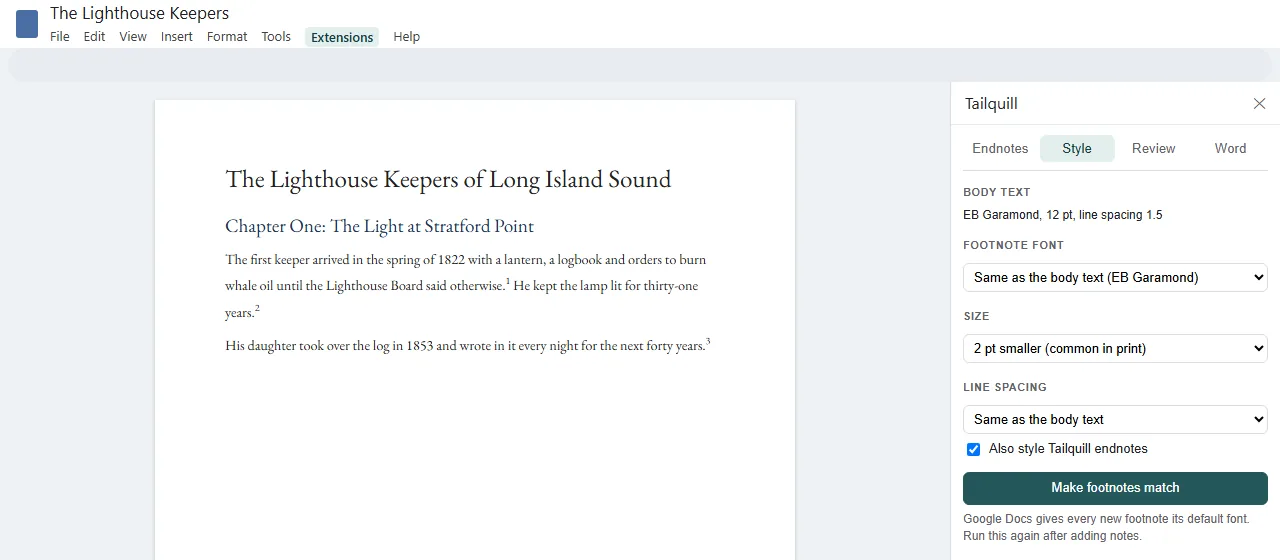
Every footnote in the document changes in one go; the body text isn't touched. Because Docs gives new footnotes the default formatting again, run Make footnotes match once more after you add notes, or simply use Extensions > Tailquill > Make footnotes match body text from the menu as the last step before you hand the paper in. Italics in a note, such as a book title, are kept.
What size should footnotes be?
- School papers: many instructors want footnotes in the same font as the text, and often a size or so smaller. If the assignment says nothing, match the body font and use the same or a slightly smaller size.
- Chicago and Turabian: notes are usually single spaced, with a blank line between one note and the next.
- Books: notes are commonly set 1 to 2 points smaller than the text. Tailquill's "2 pt smaller" option is there for this.
Need endnotes rather than footnotes? See how to add endnotes in Google Docs and how to convert footnotes to endnotes. Tailquill's Style tab can format those endnotes too.
Questions & answers
Why are my footnotes in a different font from my text?
Google Docs gives each new footnote its own default formatting instead of copying your body text, so an essay in Times New Roman can end up with footnotes in Arial. You have to change them yourself, or with an add-on.
Can I set a default footnote font in Google Docs?
No. Docs has paragraph styles for Normal text, Title, Subtitle and Headings 1 to 6, but no footnote style, so there is nothing to save as a default. Every new footnote needs fixing, which is why a one-click tool helps.
How do I change the font size of all footnotes at once?
Docs can't select every footnote at once. Either format one footnote and copy that formatting to the others with Paint format, or use Tailquill's Make footnotes match, which sets the font, size and line spacing of every footnote in one click, free.
What size should footnotes be?
Follow your style guide or instructor. Many ask for the same font as the body text; published books often set notes 1 or 2 points smaller than the text.
How do I change footnote line spacing in Google Docs?
Select the footnote text, then choose Format > Line & paragraph spacing. Footnotes are often single spaced even when the paper is double spaced. Tailquill can set the spacing for every footnote at once.
Does Make footnotes match change my body text?
No. It changes only the footnotes, and Tailquill endnotes if you tick that box. Edit > Undo reverses it.